
XMP metadata is stored as XML text and can hold any name/value pairs. You can programmatically add a custom XMP metadata package to images. This article shows how to add or remove custom XMP metadata from GIF using C#.
The following topics are covered:
- C# API for Adding or Removing XMP Metadata
- Add Custom XMP Metadata Package to GIF using C#
- Read Custom XMP Metadata Package Properties using C#
- Remove Custom XMP Metadata Package using C#
C# API for Adding or Removing XMP Metadata
I use the GroupDocs.Metadata for .NET API to add or remove custom XMP metadata. It supports adding, editing, retrieving, and deleting metadata across many standards, including XMP, EXIF, IPTC, and custom properties. The API works in any .NET development environment.
You can either download the DLL or install it via NuGet.
Install-Package GroupDocs.Metadata
Add Custom XMP Metadata Package to GIF using C#
Follow these steps to create and add a custom XMP package:
- Create an instance of the Metadata class
- Provide the GIF image path
- Call GetRootPackage to obtain an IXmp object
- Instantiate an XmpPackage object
- Set the package Prefix and NamespaceUri
- Add properties with the Set method
- Create an XmpPacketWrapper object
- Use the AddPackage method to add the XmpPackage
- Assign the XmpPacketWrapper to IXmp.XmpPackage
- Save the file with Metadata.Save
The code adds the XMP package to the input GIF. The ExifTool reads the following metadata from the generated GIF.
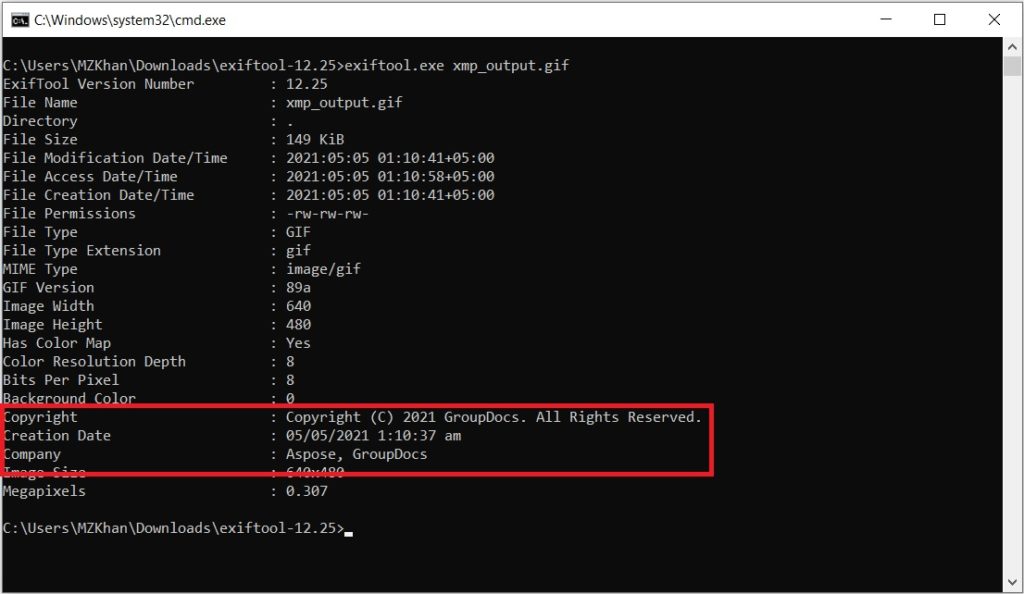
Add XMP Metadata Package to GIF using C#
The IXMP interface exposes the XmpPackage{.broken_link} property for getting or setting the XMP package.
The Metadata class provides GetRootPackage to access all metadata properties in the file.
The XmpPackage class defines package details such as Prefix, NamespaceUri, and Keys. Use its Set methods to add custom name/value pairs.
The XmpPacketWrapper class holds the serialized XMP package. Its AddPackage method adds the custom package.
More details are available in “Working with XMP Metadata”.
Read Custom XMP Package Metadata Properties using C#
Read all custom XMP properties with these steps:
- Create a Metadata instance
- Provide the GIF path
- Call GetRootPackage to get an IXmp object
- Iterate over IXmp.XmpPackage.Packages
- Retrieve NamespaceUri and Prefix for each package
- Use FindProperties to obtain each property’s name and value
Output example:
https://groupdocs.com
gd
gd:Copyright: Copyright (C) 2021 GroupDocs. All Rights Reserved.
gd:CreationDate: 04/05/2021 2:26:17 am
gd:Company: <rdf:Seq><rdf:li>Aspose</rdf:li><rdf:li>GroupDocs</rdf:li></rdf:Seq>
The FindProperties method of XmpPackage recursively searches for metadata that matches the given predicate.
Remove Custom XMP Package using C#
Remove an XMP package from a GIF with these steps:
- Create a Metadata instance
- Provide the GIF path
- Call GetRootPackage to obtain an IXmp object
- Set IXmp.XmpPackage to null
- Save the file with Metadata.Save
The code removes the XMP package. ExifTool shows the updated metadata in the output GIF.
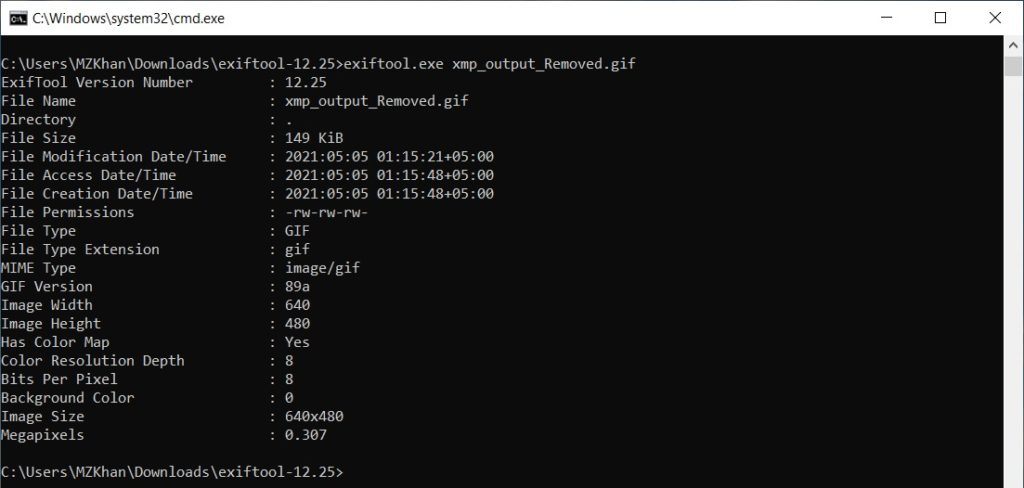
Remove XMP Metadata Package from GIF using C#
Get a Free License
Request a free temporary license to use the API without evaluation limits.
Conclusion
You now know how to add, read, and delete custom XMP metadata packages in GIF images using C#. Explore more about GroupDocs.Metadata for .NET in the documentation. For questions, visit the forum.